To isolate voice from background noise, there are several techniques that can be used. One method is to use a noise reduction plugin such as iZotope RX or Waves X-Noise which can help reduce the unwanted background noises in a recording. Another technique is to use an equalizer (EQ) and adjust the frequencies of the audio track so that only the voice frequencies remain prominent.
This can also help reduce any other lower frequency noises or hums within a recording. Additionally, you could try using a de-esser to remove excess sibilance from vocal recordings if present. Finally, you could apply dynamic processing like compression or limiters on your vocal tracks to further enhance them in relation to other elements in the mix.
- Record audio in a quiet environment: The first step to isolating voice from background noise is to record the audio in an environment that has minimal external sound interference such as a recording studio or other controlled space
- This will help reduce any unwanted noises and make it easier for you to isolate the voice later on
- Use noise reduction software: You can use specialized software like Adobe Audition or Audacity to minimize the effect of background noise by running a filter over your audio track
- This will allow you to reduce, remove, or even suppress any kind of background sounds that are interfering with your recording
- 3
- Adjust settings and levels manually: If needed, you can also adjust settings and levels manually within the software application so that only your speaker’s voice stands out from the rest of the soundscape (this should be done carefully)
- You may need to experiment with different settings until you achieve desirable results
- Export file: Once all edits have been made, export the file into whichever format desired – WAV, MP3 etc
- , depending on what type of playback device/software is being used for playback purposes
Remove Background Noise from Audio Recording Online Free
Removing background noise from an audio recording can be done for free online using a variety of tools. There are plenty of websites and programs that offer this service at no cost, such as Audacity, Krisp.ai and Auphonic. By utilizing these resources, you can easily reduce or eliminate any unnecessary sounds that may distract the listener from your desired message.
Additionally, many of these services also allow you to adjust the volume level and equalize frequencies in order to further refine the sound quality of your recordings.
Keep Voice, Remove Background Noise And Music
Removing background noise and music from a recording can be an important step in preserving the clarity of your voice. With today’s audio editing tools, it is easier than ever to keep your recordings sounding professional by filtering out any unwanted background sound and eliminating distracting music or other sounds. By using noise reduction techniques and specialised software, you can ensure that the focus stays on your voice while still keeping the quality high.
Remove Background Noise from Audio Online
Removing background noise from audio online is easier than ever with the use of specialized software. With such software, users can quickly and easily reduce or eliminate unwanted noise from their recordings without having to go into a professional studio. This makes it possible for anyone to produce clean, high-quality audio recordings without breaking the bank.
Audacity Remove Background Noise
Audacity is a free audio editing software that can be used to remove background noise from your recordings. It has an “Noise Reduction” feature which allows you to access powerful tools such as Noise Profile, Click Removal, and Clip Fixing so that you can clean up the background noise in your recordings with minimal effort. Audacity also features additional effects like Equalization and Dynamics Processing to further enhance the sound of your recording.
Background Noise Removal App
Background noise removal apps are becoming increasingly popular, as they can help to reduce unwanted noise from recordings and videos. These apps use advanced audio technology to filter out background sounds like wind, traffic and other ambient noises, leaving only the desired sound quality behind. They can be used for a variety of purposes such as podcasting, voice-over work or just improving the overall sound quality of an audio recording.
With advancements in AI-powered audio processing algorithms, these apps offer powerful features that can save time and make your recordings sound professional.
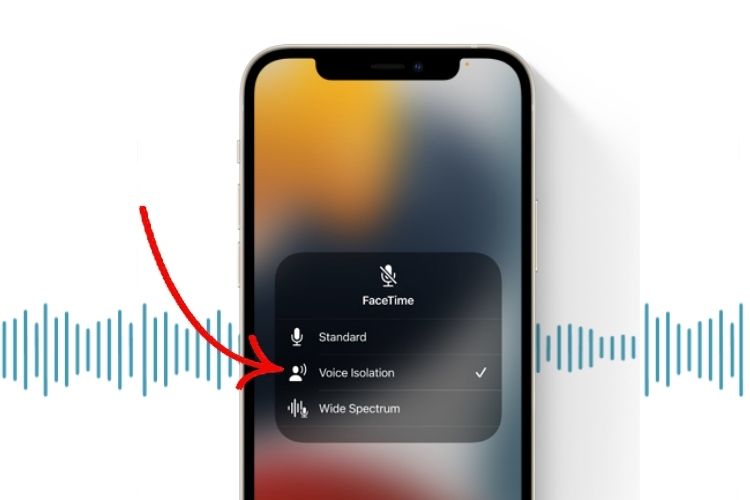
Credit: beebom.com
How Do I Separate Voice And Background Noise?
Using audio filters and noise reduction techniques is the best way to separate voice and background noise. To do this, you can use a high-pass filter to reduce lower frequencies associated with background noises like traffic or air conditioning systems. You can also try using an equalizer to cut off certain frequency bands associated with ambient sound.
Additionally, dynamic range compression can help isolate your vocal track from other sounds by reducing the difference between loud and soft elements in the mix. Lastly, look for specific plugins designed specifically for removing background noise that will allow you to carefully adjust your audio before mixing it into your final product.
How Do I Isolate Voice from Background Noise App?
To isolate voice from background noise in an app, the best way to go is by using a noise reduction plugin. These plugins can be found for both iOS and Android platforms and will help to filter out any unwanted sound while preserving the clarity of your vocal track. The most popular noise reduction plugins are iZotope RX, Waves WNS Noise Suppressor, and FabFilter Pro-Q2 which all offer real-time processing with adjustable controls so you can fine tune the results until you get the desired effect.
Additionally, some apps such as Adobe Audition have built in noise reduction tools that allow users to adjust parameters like frequency range and intensity levels for more precise control over how much noise is being removed.
How to Isolate Voice from Background Noise on Video on Iphone?
To isolate voice from background noise on video recorded with an iPhone, you can use a few different methods. One of the most effective is to adjust the audio settings in your video editor. Most video editors have options for adjusting volume levels and reducing background noise.
You can also try using a noise-cancelling app or plug-in that will help reduce ambient noises like wind or traffic while preserving the clarity of voices. Additionally, investing in external microphones can be helpful as they are typically more sensitive than built-in phone mics and allow you to better capture sound without picking up unnecessary background noise.
How to remove background noise with Audacity
Conclusion
In conclusion, isolating voice from background noise is a difficult but achievable task. With the right techniques and tools, it can be done quickly and effectively. It’s important to keep in mind that each situation is different and may need its own approach for best results.
By following these steps, you should be able to easily isolate your voice from any background noise.