You can mirror your phone to another phone by using apps like ApowerMirror, ScreenShare, and AirView. These apps allow you to mirror the screen of one phone onto another, whether it’s an Android to Android, iOS to iOS, or iOS to Android connection.
With these apps, you can easily share movies, videos, and games with your friends without having to share the same phone screen. Plus, some apps like ApowerMirror also offer additional features such as mirroring your mobile devices to a PC or TV.
So, if you’re looking to mirror your phone to another phone, these apps are a great option to consider.
Why Use A Phone Mirroring App?
Phone mirroring apps have become increasingly popular among smartphone users. They allow you to mirror the screen of one phone onto another, enabling a seamless sharing experience. Whether you want to share content, enjoy movies and games with friends, or watch videos on a larger screen, phone mirroring apps provide convenience and entertainment like never before. Let’s explore some of the key reasons why you should consider using a phone mirroring app.
Convenience of Sharing Content Between Phones
One of the primary advantages of using a phone mirroring app is the convenience it offers in sharing content between phones. With just a few simple steps, you can mirror your screen onto another device, allowing you to effortlessly share photos, videos, documents, and more. Whether you want to collaborate on a project, showcase your work to a group, or simply share memorable moments with your loved ones, a phone mirroring app is a convenient tool that simplifies the sharing process.
Enjoying Movies, Videos, and Games Together with Friends
Gone are the days when you had to gather around a small smartphone screen to enjoy a movie or play a game with your friends. A phone mirroring app allows you to mirror your screen onto another phone, enabling everyone to enjoy the content together. Whether you’re planning a movie night, hosting a gaming session, or simply want to share funny videos, a phone mirroring app enhances the entertainment experience by providing a larger screen for everyone to enjoy.
Watching Content on a Larger Screen
Another compelling reason to use a phone mirroring app is the ability to watch content on a larger screen. While smartphones have become increasingly powerful, there are times when a bigger display is more enjoyable. Whether you’re watching a movie, streaming videos, or browsing through photos, mirroring your screen onto a larger device such as a TV or a computer monitor ensures a more immersive and visually satisfying experience. Plus, with a phone mirroring app, you have the flexibility to choose the screen size that suits your preferences.
In conclusion, a phone mirroring app offers a multitude of benefits, including the convenience of sharing content, the ability to enjoy movies and games with friends, and the option to watch content on a larger screen. Whether you’re collaborating with colleagues, spending quality time with friends, or simply seeking an enhanced visual experience, a phone mirroring app is a valuable tool that can elevate your smartphone usage.
How To Mirror Your Android To Another Android
Screen mirroring is a convenient feature that allows you to replicate your Android device’s screen onto another Android device. Whether you want to share content with a friend or troubleshoot their device remotely, screen mirroring can come in handy. In this article, we will guide you through the process of mirroring your Android to another Android device effortlessly.
XFix YouTube tutorial
If you are a visual learner, we recommend checking out the XFix YouTube tutorial. This tutorial provides step-by-step instructions on how to mirror your Android device to another Android device. The video is concise and easy to follow, making it a great resource for beginners.
Entering the code on the other phone
After you have installed a screen mirroring app on your Android device, you will need to enter a specific code on the other Android device to establish a connection. The code acts as a security measure to ensure that only authorized users can access your screen. Follow the instructions provided by the screen mirroring app to enter the code correctly.
Letting the other person know you’re watching their screen
Before you start screen mirroring on the other person’s Android device, it’s crucial to inform them that you will be able to see their screen. Respect their privacy and obtain their consent before proceeding with screen sharing. Openly communicate the purpose of mirroring and assure them that their personal information will not be compromised.
How to stop screen sharing
If you want to stop screen sharing before the other person does, you can easily do so by accessing the screen mirroring app’s settings on your Android device. Look for the “Stop Sharing” or similar option and select it to end the mirroring session. Remember to inform the other person once you have stopped screen sharing to maintain transparency.
Where can the two devices be?
The two devices involved in screen mirroring need to be in close proximity to establish a stable connection. Ideally, they should be within a reasonable distance from each other, ensuring a reliable Wi-Fi or Bluetooth signal. Avoid mirroring across long distances or through walls, as this may result in connectivity issues and a less than optimal mirroring experience.
Best Screen Mirroring Apps For Android To Tv
AirDroid
AirDroid is one of the best screen mirroring apps available for Android devices. With AirDroid, you can easily mirror your Android phone to your TV, allowing you to enjoy your favorite movies, videos, and games on a bigger screen. This app offers a user-friendly interface and has various features that make screen mirroring a seamless experience. Whether you want to share content with friends or simply want to enjoy a larger display, AirDroid is a top choice.
ApowerMirror
ApowerMirror is another excellent screen mirroring app for Android to TV. This app allows you to mirror your Android phone’s screen to your TV effortlessly. With ApowerMirror, you can stream videos, play games, and even access social media platforms on your TV. The app offers high-quality screen mirroring with low latency, ensuring a smooth and lag-free experience. ApowerMirror also supports additional features like screen recording and taking screenshots, making it a versatile app for all your mirroring needs.
TeamViewer
TeamViewer is not only a popular remote access software but also a reliable screen mirroring app for Android to TV. With TeamViewer, you can easily connect and mirror your Android phone’s screen to your TV wirelessly. This app offers a secure connection and allows you to control your Android phone from your TV. It is a great option for presentations, gaming, and accessing your phone’s content on a larger screen. TeamViewer ensures smooth and lag-free mirroring, making it a preferred choice for many users.
LetsView
LetsView is a free screen mirroring app that is compatible with Android devices. It allows you to mirror your Android phone to your TV without any hassle. With LetsView, you can enjoy movies, videos, and games on a bigger screen and share content with friends and family. This app offers a user-friendly interface and provides a stable and seamless mirroring experience. LetsView supports both wireless and wired connections, giving you flexibility in how you connect your phone to your TV.
Phone mirror app
Phone mirror app is a versatile screen mirroring app that allows you to mirror your Android phone to your TV effortlessly. It offers a simple and intuitive interface, making it easy to navigate and use. With Phone mirror app, you can enjoy your favorite movies, videos, and games on a larger screen, enhancing your viewing experience. This app ensures high-quality mirroring with low latency, providing a smooth and lag-free experience. Phone mirror app is a reliable choice for all your screen mirroring needs.
AnyDesk
AnyDesk is a powerful screen mirroring app that enables you to mirror your Android phone’s screen to your TV with ease. This app offers a seamless and lag-free mirroring experience, allowing you to enjoy your favorite content on a bigger screen. Whether you want to watch movies, stream videos, or play games, AnyDesk provides high-quality mirroring with low latency, ensuring smooth and crisp visuals. AnyDesk also offers additional features like remote control and file transfer, making it a comprehensive screen mirroring solution.
MirrorGo – Mirror Android screen
MirrorGo is a feature-rich screen mirroring app that allows you to mirror your Android phone to your TV effortlessly. This app offers a user-friendly interface and provides high-quality mirroring with low latency. MirrorGo enables you to enjoy movies, videos, and games on a bigger screen, enhancing your entertainment experience. With features like screen recording and taking screenshots, MirrorGo provides a complete screen mirroring solution. Whether you want to share content or simply enjoy a larger display, MirrorGo is a reliable choice for Android to TV mirroring.
Can You Mirror Your Phone To Another Phone?
Exploring the possibility of screen mirroring phones
With the advancement of technology, screen mirroring has become a popular feature among smartphone users. Many individuals are now curious to know if they can mirror their phone screens to another phone. The answer is yes! It is indeed possible to transfer your phone’s screen to another device, allowing you to enjoy movies, videos, and games together without the need to share a single screen.
Screen mirroring between phones has multiple benefits. You no longer have to huddle around a small phone screen when watching a movie or playing a game with friends. Each person can watch on their own device, ensuring a comfortable and enjoyable experience for everyone. It eliminates the need for screen sharing or passing the phone around, providing convenience and flexibility.
Enjoying movies, videos, and games together without sharing a screen
One of the significant advantages of mirroring your phone to another phone is the ability to enjoy movies, videos, and games together without sharing a screen. Whether you want to have a movie night with your loved ones or engage in multiplayer gaming, screen mirroring allows each person to have their own personalized viewing experience.
Imagine being able to watch the latest blockbuster movie on your own phone while your friend watches it on theirs, both synchronized and in real-time. No more straining your neck to get a better view or struggling to find a comfortable position. Everyone can relax and enjoy the content on their own device, enhancing the overall entertainment experience.
Additionally, screen mirroring can be a useful tool for collaborative work and presentations. You can effortlessly share your screen with colleagues or clients during meetings, allowing them to follow along and contribute without the need for physical connection or device sharing. It promotes seamless communication and enhances productivity in various professional settings.
There are several apps available that offer screen mirroring functionality between phones. Some popular choices include AirDroid, ApowerMirror, TeamViewer, LetsView, and AnyDesk. These apps provide a user-friendly interface and straightforward setup process, making it easy even for non-tech-savvy individuals to mirror their phone screens effortlessly.
In conclusion, screen mirroring between phones is indeed possible and offers a range of benefits. Whether you want to enjoy entertainment content or collaborate with others, this feature provides a convenient and enjoyable experience. So, go ahead and explore the possibilities of mirroring your phone to another phone!
Can Someone Mirror My Phone Without Me Knowing?
Can Someone Mirror My Phone Without Me Knowing?
Possibility of someone monitoring your phone without your knowledge
With the advancement of technology, it is indeed possible for someone to mirror your phone without your knowledge. While this may sound alarming, there are various methods that can be used to remotely access and monitor your device. Cybercriminals and unscrupulous individuals may exploit vulnerabilities in your phone’s operating system or use sophisticated hacking techniques to gain unauthorized access to your personal data.
Risks and vulnerabilities to consider
There are several risks and vulnerabilities that you should be aware of when it comes to unauthorized phone mirroring. These include:
- Data theft: When someone mirrors your phone, they can potentially access your personal information, including messages, emails, photos, and even financial data.
- Privacy invasion: Unauthorized phone mirroring can lead to a significant invasion of your privacy, as the person monitoring your device can see your online activities, browsing history, and even listen to your conversations.
- Malware installation: In some cases, hackers may use malicious software to gain remote access to your phone. This can allow them to manipulate your device, install additional malware, or even control it remotely.
Ways to prevent unauthorized mirroring
To protect yourself from unauthorized phone mirroring, it is essential to take proactive measures to safeguard your device. Here are some effective strategies to prevent unwanted access:
- Keep your phone updated: Regularly update your phone’s operating system and applications to ensure that you have the latest security patches and bug fixes.
- Use a strong passcode or biometric authentication: Set a strong passcode or use biometric authentication like fingerprint or facial recognition to prevent unauthorized physical access to your device.
- Be cautious of suspicious links and attachments: Avoid clicking on unknown links or downloading suspicious attachments, as they may contain malware that can compromise your phone’s security.
- Enable two-factor authentication: Enable two-factor authentication for your accounts to add an extra layer of security and prevent unauthorized access.
- Install a reputable security app: Use a trusted security app that offers features like malware detection, anti-theft protection, and remote data wiping in case your phone gets lost or stolen.
By implementing these preventive measures and staying vigilant, you can significantly reduce the risk of someone mirroring your phone without your knowledge.
Is There An App To Mirror Someone’S Iphone?
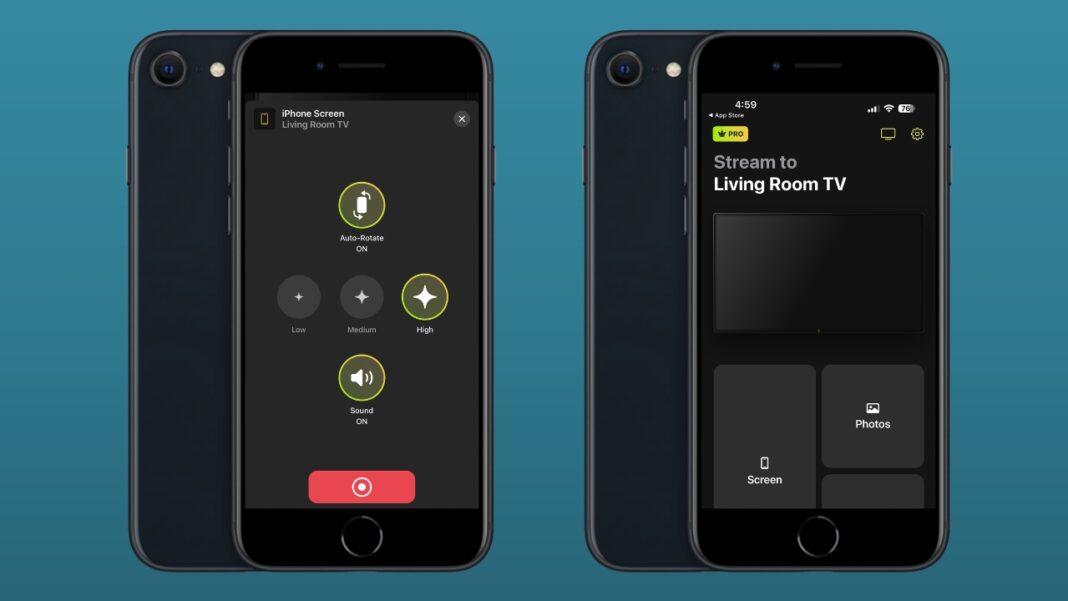
In today’s digital age, we often find ourselves in situations where we wish to share the content on our iPhone screens with someone else. Whether it’s watching a movie, sharing photos, or playing games, the desire to mirror our iPhone screen to another device is quite common. But is there an app that can help us achieve this? The answer is yes, and one such app is ApowerMirror. Let’s explore how you can use ApowerMirror to mirror one iPhone screen to another.
Introduction to ApowerMirror
ApowerMirror is a screen mirroring app that offers a seamless solution for mirroring one iPhone screen to another. This app, available for download from the Apple Store, eliminates the need for physical connections or complicated setups. With ApowerMirror, you can effortlessly share your iPhone screen with friends, family, or colleagues, providing a truly immersive and interactive experience.
Screen mirroring one iPhone to another using ApowerMirror
The process of screen mirroring one iPhone to another using ApowerMirror is straightforward. First, install the ApowerMirror app from the Apple Store on both iPhones that you wish to connect. Once installed, follow these simple steps:
- Launch the ApowerMirror app on both iPhones.
- Connect both iPhones to the same Wi-Fi network.
- On the iPhone you wish to mirror, tap the “Mirror” button within the ApowerMirror app.
- From the list of available devices, select the other iPhone that you want to mirror to.
- Once connected, the screen of the mirrored iPhone will be displayed on the receiving iPhone in real-time.
With these simple steps, you can now enjoy the convenience of mirroring one iPhone screen to another using ApowerMirror. Whether you want to share memorable moments with loved ones or collaborate on work projects, ApowerMirror provides a versatile solution for all your screen mirroring needs.
Installation process from the Apple Store
To install ApowerMirror from the Apple Store, follow these steps:
- Open the Apple Store on your iPhone.
- Search for “ApowerMirror” in the search bar.
- Tap on the app from the search results.
- Tap the “Get” button to start the installation process.
- Once the installation is complete, you can find the ApowerMirror app on your home screen.
By following these simple steps, you can quickly install ApowerMirror from the Apple Store and unlock the powerful features it offers for screen mirroring between iPhones.
Credit: www.macgasm.net
Frequently Asked Questions For App That Mirrors Another Phone
Can You Mirror Your Phone To Another Phone?
Yes, you can mirror your phone to another phone to share movies, videos, and games with your friend.
Can Someone Screen Mirror My Iphone Without Me Knowing?
Yes, someone can screen mirror your iPhone without your knowledge.
Is There An App To Mirror Someone’S Iphone?
Yes, there is an app called ApowerMirror that can mirror someone’s iPhone. It can be downloaded from the Apple Store and allows for screen mirroring between iPhones.
How Can I Monitor Another Phone?
To monitor another phone, you can use apps like AirDroid, mSpy, Mobile Tracker Free, uMobix, WebWatcher, KidsGuard Pro, Hoverwatch, or iKeyMonitor. These apps allow you to track and monitor the activities on someone’s phone remotely.
Conclusion
As technology continues to advance, the ability to mirror one phone to another has become an increasingly popular feature. Whether you want to share movies, videos, or games with a friend without sharing the same screen, or you need to monitor someone’s phone discreetly, there are apps available to fulfill these needs.
With options like ApowerMirror, ScreenShare, and AirView, users can easily mirror their phones to another device, whether it’s Android-Android, iOS-iOS, or iOS-Android. These apps not only provide screen mirroring capabilities but also offer additional features like remote control and file transfer.
However, it’s important to note that while these methods are convenient, it’s also crucial to prioritize privacy and security. Always ensure that you are using trusted apps from reputable sources to protect your personal information. So, whether you want to enjoy shared entertainment or keep an eye on someone’s phone, screen mirroring apps provide a seamless and convenient solution.
Explore the available options and make the most of this innovative technology.